Hold to Talk Alternatives
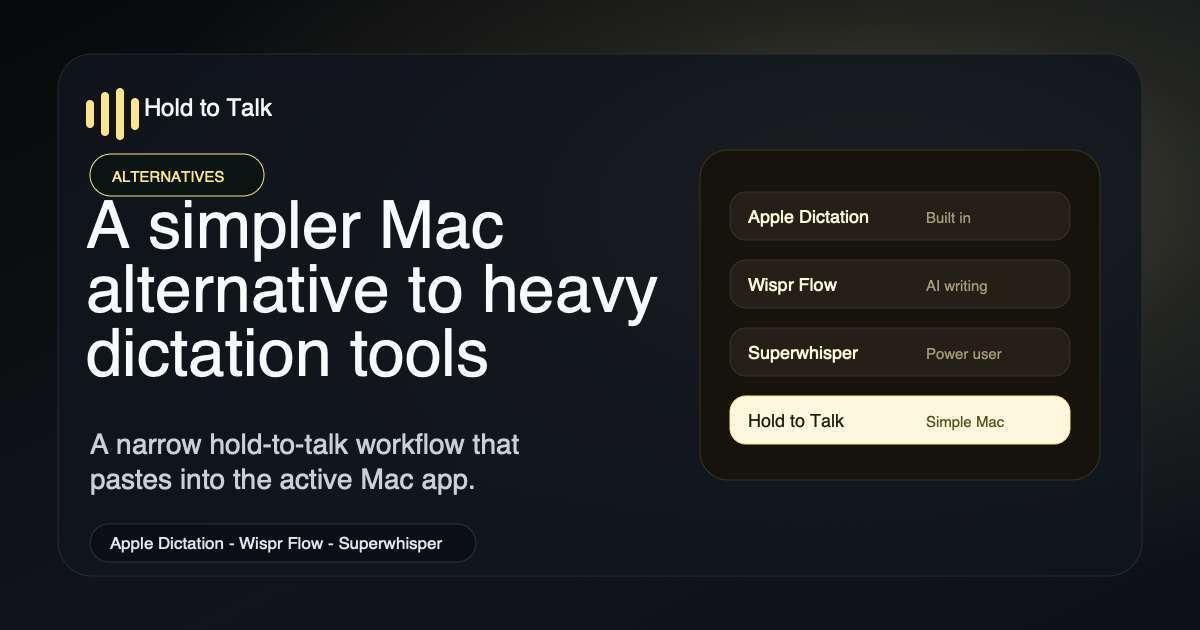
Quick answer: Hold to Talk is best when you want fast Mac dictation without cross-platform sync, AI rewriting, local-model setup, transcript workspaces, or meeting features. Compare it with Apple Dictation, Wispr Flow, the common Whisper Flow search spelling, Superwhisper, MacWhisper, VoiceInk, Handy, Aqua Voice, Willow Voice, Spokenly, Typeless, OpenWhispr, and Aiko below.
What happens after install
See the demo- Focus any Mac text field.Cursor, ChatGPT, Slack, email, docs, terminals, browser forms, and more.
- Hold the shortcut and speak.Use Option-Space or a custom hotkey only while you are talking.
- Release to paste.The transcript appears in the active app instead of a separate dictation workspace.
- Review before sending.Hold to Talk never auto-submits prompts, messages, emails, or commands.
Comparison paths
Start with the comparison or buying path that matches what you are replacing.
Alternatives and comparisons
For users comparing Hold to Talk with Apple Dictation, Wispr Flow, Whisper Flow search intent, Superwhisper, MacWhisper, VoiceInk, Handy, Aqua Voice, Willow Voice, Spokenly, Typeless, OpenWhispr, Aiko, and other Mac dictation workflows.
- Hold to Talk AlternativesThe main comparison hub for Mac dictation options.
- Hold to Talk vs Wispr FlowCompare simple Mac hold-to-talk dictation with cross-platform AI voice writing.
- Hold to Talk vs Whisper FlowRoute the common Whisper Flow search spelling to the Wispr Flow buying decision.
- Hold to Talk vs SuperwhisperCompare simple hold-to-talk dictation with Superwhisper's configurable model-focused workflow.
- Hold to Talk vs Apple DictationCompare the built-in Mac dictation workflow with a dedicated hold-to-talk app.
- Hold to Talk vs MacWhisperCompare simple live dictation with broader audio-file, meeting, and transcript workflows.
- Hold to Talk vs VoiceInkCompare simple cloud zero-retention dictation with local-first open-source dictation.
- Hold to Talk vs HandyCompare hosted productized Mac dictation with free local open-source speech-to-text.
- Hold to Talk vs Aqua VoiceCompare simple Mac hold-to-talk dictation with broader AI-refined voice writing.
- Hold to Talk vs Willow VoiceCompare simple Mac hold-to-talk dictation with personalized AI formatting and cross-device voice writing.
- Hold to Talk vs SpokenlyCompare managed Mac dictation with free local models and bring-your-own cloud engines.
- Hold to Talk vs TypelessCompare simple Mac hold-to-talk dictation with cross-platform AI cleanup, tones, actions, and team controls.
- Hold to Talk vs OpenWhisprCompare managed Mac dictation with open-source local cross-platform voice-to-text.
- Hold to Talk vs AikoCompare live hold-to-talk dictation with on-device audio and video transcription.
- Wispr Flow vs SuperWhisper vs Hold to TalkA side-by-side comparison of three talk-to-type apps for Mac.
Alternative guide pages
Source-backed replacement guides for people comparing simple Mac dictation, local-first transcription, AI writing assistants, and built-in Apple Dictation.
- Apple Dictation AlternativeWhen built-in Mac dictation is enough and when a hold-to-talk app is faster.
- Wispr Flow AlternativeCompare simple Mac dictation with cross-platform AI voice writing.
- Superwhisper AlternativeCompare simple hold-to-talk dictation with offline models and power-user routing.
- MacWhisper AlternativeCompare live dictation into apps with broader transcript and meeting workflows.
- VoiceInk AlternativeCompare a simple cloud zero-retention workflow with local-first open-source dictation.
- Handy AlternativeCompare a productized hosted workflow with local open-source speech-to-text.
- Aqua Voice AlternativeCompare Mac-only hold-to-talk dictation with AI-refined voice writing.
- Aiko AlternativeCompare live dictation into active text fields with on-device file transcription.
- Wispr Flow vs SuperWhisper vs Hold to TalkA direct comparison of three talk-to-type apps for Mac.
Mac dictation basics
For users who are not sure whether they need a separate app yet.
- Best Dictation Apps for MacA broad overview of Mac dictation options.
- How to Use Voice-to-Text on MacStart with built-in Mac dictation, then compare dedicated workflows.
- Mac Dictation Not Working? Try ThisTroubleshoot Apple's dictation workflow before switching tools.
- Apple Dictation AlternativeCompare the built-in Apple workflow with a hold-to-talk app.
Private Mac dictation
For privacy-sensitive users comparing local transcription, zero retention, and everyday cloud dictation.
- Private Dictation Apps for MacA practical guide to privacy models in Mac dictation apps.
- Offline Dictation Apps for MacUnderstand when audio must stay on device and when zero-retention cloud transcription is enough.
- Privacy PolicyHold to Talk privacy and retention details.
- Apple Dictation AlternativeWhen Apple's built-in dictation is enough and when hold-to-talk is faster.
- Best Free Dictation App for MacStart with free built-in dictation, then compare a dedicated free-plan workflow.
- Superwhisper AlternativeCompare a lightweight cloud zero-retention workflow with offline model control.
Developer dictation
For prompts, coding agents, code review, terminal sessions, docs, and project notes.
- Voice Dictation for DevelopersThe main developer workflow page for Cursor, Claude Code, Codex, Devin Desktop, GitHub, Slack, and docs.
- Best Voice-to-Text App for Developers on MacA buying guide for developer-specific dictation needs.
- Best Dictation App for AI Coding AgentsA buying guide for choosing Mac dictation across Cursor, Claude Code, Codex, Windsurf, Warp, Zed, and Copilot prompts.
- Voice Dictation for AI Coding AgentsA hub for speaking full implementation prompts into Cursor, Claude Code, Codex, Devin, Windsurf, Warp, Zed, and terminal agents.
- Developer AI Prompt ExamplesCopyable prompt examples for Cursor, Claude Code, Codex, Devin Desktop, ChatGPT, Gemini, terminal agents, GitHub, and tickets.
- How to Dictate into CursorA focused Cursor workflow for chat, Composer, editor buffers, and terminal panes.
- How to Dictate into VS CodeA VS Code workflow for chat, inline chat, editor text, source control, and integrated terminal prompts.
- How to Dictate GitHub Copilot PromptsA focused workflow for speaking longer Copilot Chat and inline chat prompts.
- How to Dictate into Claude CodeA terminal-safe workflow for speaking Claude Code prompts.
- How to Dictate into CodexA practical workflow for speaking coding-agent prompts into Codex.
- How to Dictate into Devin Desktop and WindsurfA coding-agent workflow for speaking Devin Desktop and Windsurf prompts, bug reports, and refactor requests.
- How to Dictate into WindsurfA focused workflow for speaking Windsurf and Cascade coding-agent prompts.
- How to Dictate into WarpA terminal-safe workflow for speaking Warp Agent prompts, command drafts, and debugging notes.
- How to Dictate into Zed AIA Zed workflow for agent prompts, inline assistant requests, terminal threads, and commit notes.
- How to Dictate into Raycast AIA Mac power-user workflow for speaking Quick AI, AI Chat, and AI Command prompts.
- How to Dictate GitHub Issues and PR ReviewsA GitHub workflow for issues, pull request descriptions, and review comments.
- Voice Dictation for Code Review CommentsA review-writing workflow for clearer pull request feedback.
- How to Dictate into Linear and JiraA ticket-writing workflow for bug reports, acceptance criteria, and triage notes.
Directory facts for alternatives listings
Use these neutral facts when evaluating Hold to Talk for alternatives directories, comparison catalogs, and app databases.
| Field | Value |
|---|---|
| Official website | https://holdtotalk.com/ |
| Comparison hub | https://holdtotalk.com/alternatives/ |
| Structured comparison feed | https://holdtotalk.com/alternatives.json |
| Application type | Audio transcription tool; productivity; OS utility |
| Platform | Mac |
| License | Freemium / free plan with Pro subscription available |
| Category | Mac dictation app, voice-to-text app, speech-to-text software |
| Tags | dictation, voice-to-text, speech-to-text, macOS, productivity, developer tools, AI prompts |
| Best-fit users | Mac users who want fast hold-to-talk dictation into the active app |
| Not positioned as | Meeting recorder, offline transcription suite, cross-platform AI writing assistant, or transcript workspace |
AlternativeTo listing guidance
Use these constraints for AlternativeTo and similar alternatives directories before opening the signed-in submission flow.
| Field | Guidance |
|---|---|
| Official website field | Use the clean URL https://holdtotalk.com/ instead of a UTM-tagged tracker URL. |
| Description field | Use the neutral link-free description from the submission packet; do not include URLs, email addresses, phone numbers, or pricing details in the description text. |
| License | Use Freemium / Free with limited functionality because Hold to Talk has a usable free plan and a paid Pro upgrade. |
| Platform | Mac |
| Application type | Audio Transcription Tool; Productivity; OS & Utilities |
| Tags | dictation, voice-to-text, speech-to-text, macos, productivity, developer-tools, ai-prompts |
| Closest existing pages | Superwhisper, Wispr Flow, Whisper Flow search spelling, Handy, SayCopyPaste, VoiceInk, MacWhisper, Willow Voice, Spokenly, Typeless, and OpenWhispr. |
| Best supporting pages | Use the Wispr Flow, Whisper Flow search spelling, Superwhisper, Handy, MacWhisper, VoiceInk, Aqua Voice, Willow Voice, Spokenly, Typeless, OpenWhispr, Apple Dictation, and main alternatives comparison pages as evidence. |
| Duplicate check | No current Hold to Talk listing was found in the recorded AlternativeTo listing check. |
| Account constraint | A new AlternativeTo account may need to wait one week before submitting a new application page. |
Supporting comparison URLs
Use these owned comparison pages if a directory asks for existing alternatives, related pages, or support for the category fit.
Suggested comparison set
These are the adjacent apps and workflows to compare when a directory asks where Hold to Talk should appear as an alternative.
- Apple Dictation
- Wispr Flow
- Superwhisper
- MacWhisper
- VoiceInk
- Handy
- Aqua Voice
- Willow Voice
- Spokenly
- Typeless
- OpenWhispr
- Aiko
- SayCopyPaste
Reviewer assets and data
Compare Mac dictation options
Apple Dictation alternative
Use Apple Dictation for occasional built-in dictation. Use Hold to Talk when you want a faster hold-to-talk workflow, custom vocabulary, and text pasted into common editable fields.
Compare Apple Dictation
Wispr Flow alternative
Use Wispr Flow for cross-platform AI writing assistance. Use Hold to Talk when you want a simpler Mac-only dictation app without an AI rewriting layer.
Compare Wispr Flow
Whisper Flow search comparison
People often search for Whisper Flow when they mean Wispr Flow. Use this route for the exact search spelling and the same Hold to Talk vs Wispr Flow decision.
Compare Whisper Flow
Superwhisper alternative
Use Superwhisper for offline models and power-user routing. Use Hold to Talk when you want one shortcut for fast Mac dictation without model setup.
Compare Superwhisper
MacWhisper alternative
Use MacWhisper for audio files, meetings, transcripts, and AI provider options. Use Hold to Talk when you want simpler live dictation into the active app.
Compare MacWhisper
VoiceInk alternative
Use VoiceInk for local-first open-source dictation with modes and AI enhancement. Use Hold to Talk when you want a simpler cloud zero-retention hold-to-talk workflow.
Compare VoiceInk
Handy alternative
Use Handy for free local open-source speech-to-text. Use Hold to Talk when you want hosted transcription, custom vocabulary, local history, and a managed Mac app.
Compare Handy
Aqua Voice alternative
Use Aqua Voice for AI-refined voice writing across desktop and mobile. Use Hold to Talk when you want simpler Mac-only hold-to-talk dictation.
Compare Aqua Voice
Willow Voice alternative
Use Willow Voice for personalized AI formatting, context-aware suggestions, and cross-device voice writing. Use Hold to Talk when you want simple Mac hold-to-talk dictation.
Compare Willow Voice
Spokenly alternative
Use Spokenly for free local models, BYOK cloud engines, iPhone, and Windows. Use Hold to Talk when you want a managed Mac-only workflow with fewer choices.
Compare Spokenly
Typeless alternative
Use Typeless for cross-platform AI cleanup, tones, actions, and team controls. Use Hold to Talk when you want a smaller Mac menu bar dictation app.
Compare Typeless
OpenWhispr alternative
Use OpenWhispr for open-source local-first voice-to-text on macOS, Windows, and Linux. Use Hold to Talk when you want a managed Mac utility.
Compare OpenWhispr
Aiko alternative
Use Aiko for on-device transcription of audio and video files. Use Hold to Talk when you want live dictation into active Mac text fields.
Compare Aiko
How to choose
| Choose this | When you need |
|---|---|
| Hold to Talk | Fast hold-to-talk dictation on Mac that pastes into common editable text fields. |
| Apple Dictation | A free built-in option for occasional dictation without installing anything. |
| Wispr Flow | Cross-platform AI dictation, rewriting, mobile support, and team-oriented features. |
| Superwhisper | Offline transcription, model selection, API-key control, and power-user configuration. |
| MacWhisper | Audio file transcription, meeting detection, transcripts, AI providers, and organization support. |
| VoiceInk | Local-first open-source dictation, modes, context-aware AI, assistant features, and one-time licensing. |
| Aqua Voice | AI-refined voice writing, custom instructions, desktop and mobile coverage, team controls, and enterprise retention options. |
| Willow Voice | Personalized AI formatting, writing-style memory, context-aware suggestions, and Mac/Windows/iPhone voice writing. |
| Spokenly | Free local models, BYOK cloud engines, iPhone support, Windows support, and local-only network blocking. |
| Typeless | Cross-platform AI cleanup, tones, translation, ask-anything actions, team controls, and a larger free weekly allowance. |
| OpenWhispr | Open-source local-first voice-to-text on macOS, Windows, and Linux with AI notes, AI chat, and audio upload. |
| Aiko | On-device transcription for audio files, video files, meetings, lectures, exports, and Shortcuts workflows. |
Structured comparison data
Use the structured alternatives feed for machine-readable comparison facts and citation URLs.
FAQ
What is the best Hold to Talk alternative comparison to read first?
Start with the Apple Dictation alternative page if you are comparing built-in Mac dictation, or the Wispr Flow, Superwhisper, MacWhisper, VoiceInk, Handy, Aqua Voice, Willow Voice, Spokenly, Typeless, OpenWhispr, and Aiko pages if you are comparing third-party dictation apps.
When is Hold to Talk the better fit?
Hold to Talk is the better fit when you want simple Mac dictation: hold a key, speak, release, and paste into the active app without managing model choices, AI rewriting modes, or cross-platform sync.
When should you choose another dictation app?
Choose another tool if you need Windows or mobile support, fully offline transcription, meeting transcription, enterprise controls, or a broader AI writing assistant.
What categories and tags describe Hold to Talk?
Hold to Talk fits Mac productivity, speech-to-text, voice-to-text, audio transcription, developer tools, and AI prompt workflows. It is a macOS menu bar app for repeated short-form dictation into the active app.
Try Hold to Talk on Mac. Start with the free plan, then upgrade only if it fits your daily workflow.
View in the Mac App Store Watch the 8-second demo